104 自動打卡
· 閱讀時間約 3 分鐘

不想要手動打開 App 打卡
用 Playwright 加上 Github Action 來實現吧!
1. Fork 我已經寫好的 Repo
2. Clone 下來,並安裝必要套件
pip3 install -r requirements.txt

// 安裝瀏覽器
// Windows
PLAYWRIGHT_BROWSERS_PATH=%USERPROFILE%\AppData\Local\ms-playwright python -m playwright install

// Mac
PLAYWRIGHT_BROWSERS_PATH=~/Library/Caches/ms-playwright python3 -m playwright install

// Linux
PLAYWRIGHT_BROWSERS_PATH=$HOME/pw-browsers python3 -m playwright install
4. 登入並儲存 Session (效期為一個月)
會自動打開一個瀏覽器,並自動進行登入
在 60s 內填入 OTP 完成登入
就會自動關閉
此時會多一個 cred.json 會記載登入資訊
export ac=xxxx
export pwd=xxxx

python3 login.py
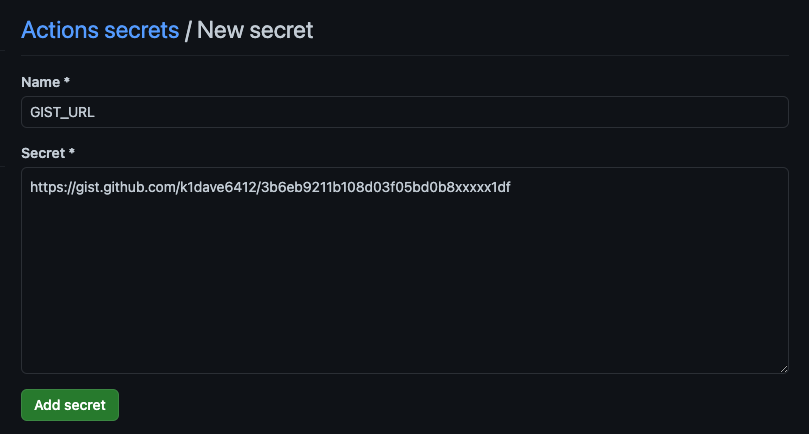
5. 建立一個私人的 gist 將 cred.json 貼上,並設定在 Action Secret
- 前往 Github Gist
- 點擊右上角進行新增
- 新增後,複製 gist url
- 新增 Action Secret
GIST_URL - 觸發 Action 即成功
建立 gist 時選 Create secret gist,檔名為
cred.json,內容貼上剛剛產生的 cookie JSON。(原截圖含 session cookie,已移除)
接下來進行自動打卡的設定
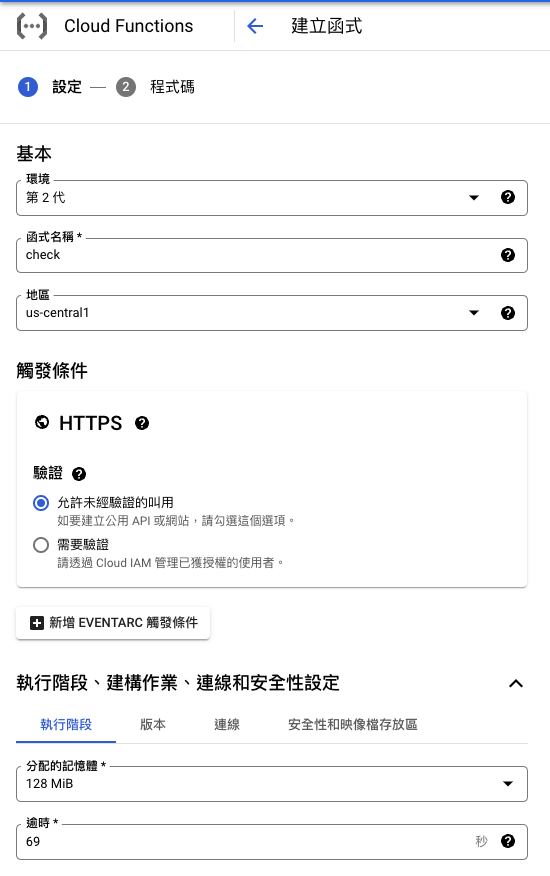
6. 設定 Cloud Function
- 允許未經允許的叫用
- 128MB
- 貼上以下程式碼
main.py
import functions_framework
import httpx

@functions_framework.http
def clock(request):
    request_json = request.get_json(silent=True)
    token = request_json["payload"]["token"]
    url = request_json["payload"]["url"]

    headers = {"Authorization": f"Bearer {token}"}
    resp = httpx.post(url, json={"ref": "main"}, headers=headers)

    if resp.status_code >= 400:
        return resp.text
    return str(resp.status_code)
requirements.txt
functions-framework==3.*
httpx
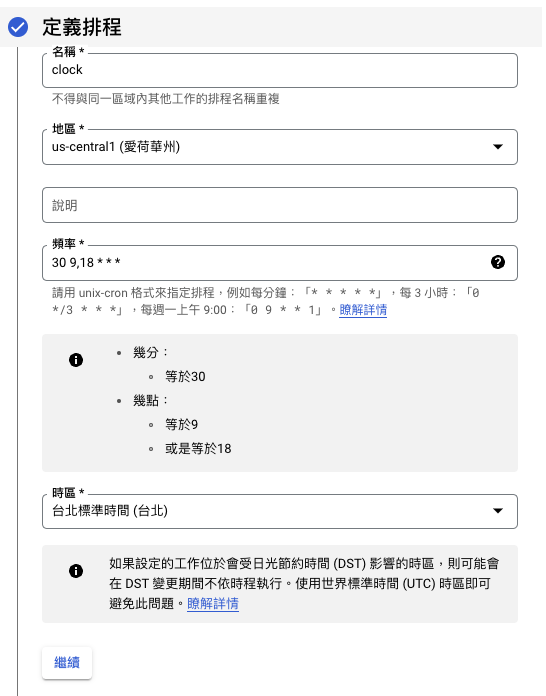
7. 設定 Cloud Scheduler
-
複製 Cloud Funcation 網址

-
設定 Cloud Scheduler 基本資料 圖中頻率為 每日早上 9 點半與晚上 6 點半打卡
-
設定 請求內容
- token 為 Github Personal Token
需有執行 workflow 權限 - url 為 workflow 觸發的網址 參考文件取得 - Gihub - Create a workflow dispatch event
payload
{
  "payload": {
    "token": "ghp_xxxxxxxxxxxxxxxxxxxxxxxxxxxx",
    "url": "https://api.github.com/repos/k1dave6412/104ClockIn/actions/workflows/42459444/dispatches"
  }
}
在「內文」貼上上面的 payload,記得把
token換成自己的 GitHub Personal Token。(原截圖含 token,已移除)
常見問題
沒有抓到瀏覽器
╔════════════════════════════════════════════════════════════╗
║ Looks like Playwright was just installed or updated.       ║
║ Please run the following command to download new browsers: ║
║                                                            ║
║     playwright install                                     ║
║                                                            ║
║ <3 Playwright Team                                         ║
╚════════════════════════════════════════════════════════════╝
原因
沒有安裝必要的測試瀏覽器
解法
執行 playwright install 或參考步驟 2